

Last update:
Last verified version: All Debian 12 based ASGARD products
Overview
During ASGARD installation, the customer sets the password for the SSH user “nextron,” which is the default root user.
This article explains how to reset a lost password.
Prerequisites
-
Access to computer console
Expected Behavior
The console keyboard access with user “nextron” is restored.
Steps to proceed
Note: The English keyboard layout applies in the GRUB console.
-
Reboot your ASGARD.
-
Type “e”, when the GNU boot screen appears.
-
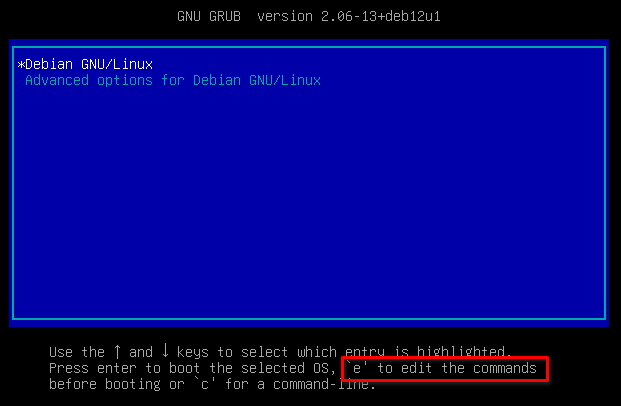
Add the following parameters after “ro quiet”:
rw init=/bin/bash -
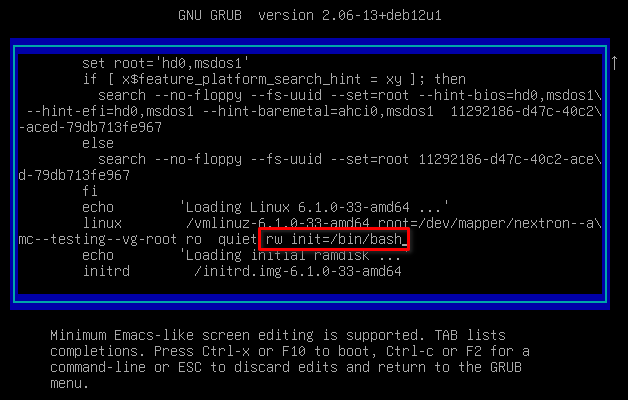
Restart the computer by pressing F10.
-
Run the following command when the console is reachable again
Bashpasswd nextron
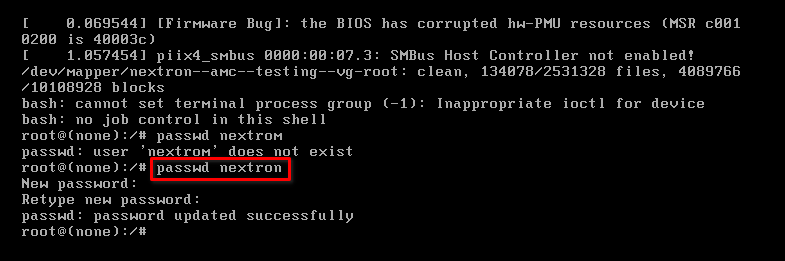
-
Restart the computer with the following command and test the new password.
Bashexec /sbin/init
Related Content
- Recreating the TLS Certificate on ASGARD Analysis Cockpit
- THOR in Lab-Mode does not scan network or external drives
- THOR Scan Error: No rules with DEEPSCAN tag found
- Troubleshooting Cockpit Login Error and MySQL Connection Issues
- GRPC Connectivity Issues: Understanding TLS Inspection Errors and Solutions