

Last update:
Last verified version: AMC 4.0.4
Issue
When debugging GRPC connectivity issues between your components (for example Management Center to Analysis Cockpit), you might encounter an error similar to the following one:
{
 "LEVEL":"Warning",
 "MESSAGE":"could not dial grpc",
 "MODULE":"api",
 "REQUEST_IP":"172.16.30.20",
 "TIME":"2023-03-06T12:35:37Z",
 "USER":"admin",
 "error":"context deadline exceeded",
 "host":"cockpit3.domain.local:7443"
}
We are currently working on improving the presented error message, to give a better understanding what might be the issue at hand.
Solution
There is no workaround for this type of error. The error usually occurs because one of the following things are preventing proper communication between your components:
-
Firewall is using TLS Inspection
-
Proxy is using TLS Inspection
-
DNS Issues
Your components expect specific certificates from each other when communicating. If a device is trying to inspect TLS traffic, the certificate will change and you receive the above error.
To help you figuring out what is causing the problem, you can try the following. You can use openssl on your source system to see which certificate is presented by the destination host (change the host and port values as needed).
The lines show you the certificate which is presented by the destination host. If this certificate is different from the one you installed, then the problem might be a device trying to do TLS Inspection.
Example 1: ASGARD Management Center to ASGARD Cockpit
root@nextron:~$: openssl s_client -host YOUR-COCKPIT-FQDN -port 7443 -servername YOUR-COCKPIT-FQDN
CONNECTED(00000003)
---
Certificate chain
 0 s:CN=nextron-aac-testing.goetz
   i:CN=nextron-aac-testing.goetz AC CA
   a:PKEY: RSA, 4096 (bit); sigalg: sha256WithRSAEncryption
   v:NotBefore: Sep 15 05:07:38 2025 GMT; NotAfter: Aug 22 05:07:38 2125 GMT
---
Server certificate
-----BEGIN CERTIFICATE-----
MIIGEjCCA/qgAwIBAgIUZ0pdaADA076QgfY9h3ZATAd1Qw8wDQYJKoZIhvcNAQEL
BQAwKjEoMCYGA1UEAwwfbmV4dHJvbi1hYWMtdGVzdGluZy5nb2V0eiBBQyBDQTAg
Fw0yNTA5MTUwNTA3MzhaGA8yMTI1MDgyMjA1MDczOFowJDEiMCAGA1UEAwwZbmV4
dHJvbi1hYWMtdGVzdGluZy5nb2V0ejCCAiIwDQYJKoZIhvcNAQEBBQADggIPADCC
AgoCggIBALizf8Nbf9CZ+q/GsudocQPFFm3gAXXR8GrKHQnYRjOL1pddbvjWdAbo
56k6EmjEuYAxC8+TBcjYd/VWm3fReIxJ2kgrNDZD+wx3awkZhBLbFYt2TvvOJcoK
U1J28KOSupkCteACo2k6NBjEZMyiRsz16Z8UoR/xldNNTRQ+ewvvyMOVZrbE5aho
4WbN0AugzPfNiICDcDeuFcyAlBCn3wIbYz4NvyvBN892Cz+6pXFizRqfTooLARK9
pOHfMdGhhV7notfanN1K7SKq8SwigeTV39DxnSZxIXeVy6AQj80WbTqeSmYuLIla
BpUtBzuwq8CgZhF4SgzmstGbxcT/ZBmNQyheUhQHYCFZARPXG0z1631N11+8frvF
6VfMmJTMzytt+ELezfnxt7533fkkBjRmDIcyxoPH960uB48eO2L07jWStfDAVeBO
FwKZcTK10LnFT6lz8NaTbqXxQD3isoeL/ToqKOCGDAzFe4Aj/q8JigoXJXZVcNuy
vTzngmbLvrmdNZ8P1WcMu5MmvyvqZnRsrjPWizRrbm3xc2AAY7ZKUeuVtl9R3zQ8
Q+rjH5/flU/ANuUWhtsWEarW/gjQCalrl+12O2i50NPClhi+3fEX1EZACS1/TjbU
02ES19j5fieQe+9riFIl1G2GSdxjwm8BCz1DK4FwEz60pHb28ZU7AgMBAAGjggEy
MIIBLjAJBgNVHRMEAjAAMBEGCWCGSAGG+EIBAQQEAwIGQDA9BglghkgBhvhCAQ0E
MBYuU2VydmVyIENlcnRpZmljYXRlIGZvciBBU0dBUkQgQW5hbHlzaXMgQ29ja3Bp
dDAdBgNVHQ4EFgQUNTCbv1bnvgxJKkAjtP9XgvMlfB4wZQYDVR0jBF4wXIAU8wQB
aZCYqV3sGb43oH1Bs88lI/GhLqQsMCoxKDAmBgNVBAMMH25leHRyb24tYWFjLXRl
c3RpbmcuZ29ldHogQUMgQ0GCFDZaZXjlHW2TyU62ZrK2IMEqs14hMA4GA1UdDwEB
/wQEAwIFoDATBgNVHSUEDDAKBggrBgEFBQcDATAkBgNVHREEHTAbghluZXh0cm9u
LWFhYy10ZXN0aW5nLmdvZXR6MA0GCSqGSIb3DQEBCwUAA4ICAQAttN6hyxHqitQz
SJ/MJtpVJeweHCDKe3p+3GJOS64fPQLeBi7x3utqqpstfX5A42MCpKF1tq0J3tfm
r+U+AREJajr/bh8Dy0WBCLIu8JkjpgUZwBbRVdVV4lmnk3eWyrCTJ92JVEowhkyF
I01Naxhd2akIdA0k1NdhUsoUBINhrS809wgq/TXa4pVOsOAUKlKhVXonbzA6VFt2
XxlQrz0AZWAqLWDW0Tj5qMzKQ8jdFUBPn1iWADvCB+GZVlw/UINwHLagx16Ye3p+
XrGWJAO90gaSXF2sQztw+PSNPcZMs1JYVlH89j08xlqoI8AtYFDLwY9fmMEqwZ3h
+iuiklbxwGGBUL7BOuKpQbnYW4ltOdSfFTMY+v/uO7e7BZD1Uyc5o3uauYnQAG2q
Jv1TeKfUlah9NRZjPkx+izYclC0VKidH1cPnhusnwVB2Tp4jF6bPqGoZBsCyIJpJ
luY2or+Ecst/js8DzGLFbQ7pMEo3QQrrI0mRBRad2QWmspzEwTEo3YdRDQ/Lwex+
VLb0xbaVXKzQZNooIJ4cOIbudUWHdWAWof7rsb0C53iF4uxASj4PZOizaT7+Jsr2
twMCYsImhLQDlCpj7QkDj13mufI0bEk24trv0NmZ/H1mzFNjHOqTIIYPkHhclOu1
5QEvgsktg8BGj850X0kqWPwYhn6cRA==
-----END CERTIFICATE-----
subject=CN=nextron-aac-testing.goetz
issuer=CN=nextron-aac-testing.goetz AC CA
---
No client certificate CA names sent
Peer signing digest: SHA256
Peer signature type: rsa_pss_rsae_sha256
Negotiated TLS1.3 group: X25519MLKEM768
---
SSL handshake has read 3442 bytes and written 1631 bytes
Verification error: unable to verify the first certificate
---
New, TLSv1.3, Cipher is TLS_AES_128_GCM_SHA256
Protocol: TLSv1.3
Server public key is 4096 bit
This TLS version forbids renegotiation.
Compression: NONE
Expansion: NONE
No ALPN negotiated
Early data was not sent
Verify return code: 21 (unable to verify the first certificate)
---
Example 2: ASGARD Windows Agent to ASGARD Management Center
To test the connection with OpenSSL on Windows, you must install it separately.
c:\Program Files\OpenSSL-Win64\bin>openssl.exe s_client -connect YOUR-AMC-FQDN:443 -CAfile c:\Windows\system32\asgard2-agent\ca.pem -servername YOUR-AMC-FQDN
Connecting to 192.168.94.1
CONNECTED(00000214)
depth=1 O=Nextron Systems GmbH, CN=ASGARD Management Center
verify return:1
depth=0 O=Nextron Systems GmbH, CN=ASGARD Management Center
verify return:1
---
Certificate chain
 0 s:O=Nextron Systems GmbH, CN=ASGARD Management Center
   i:O=Nextron Systems GmbH, CN=ASGARD Management Center
   a:PKEY: RSA, 4096 (bit); sigalg: sha256WithRSAEncryption
   v:NotBefore: Jun 13 14:36:31 2024 GMT; NotAfter: May 20 14:36:31 2124 GMT
---
Server certificate
-----BEGIN CERTIFICATE-----
MIIGXjCCBEagAwIBAgIUIRWDJCbuYaQS7/HN397DVdxBHOIwDQYJKoZIhvcNAQEL
BQAwQjEdMBsGA1UECgwUTmV4dHJvbiBTeXN0ZW1zIEdtYkgxITAfBgNVBAMMGEFT
R0FSRCBNYW5hZ2VtZW50IENlbnRlcjAgFw0yNDA2MTMxNDM2MzFaGA8yMTI0MDUy
MDE0MzYzMVowQjEdMBsGA1UECgwUTmV4dHJvbiBTeXN0ZW1zIEdtYkgxITAfBgNV
BAMMGEFTR0FSRCBNYW5hZ2VtZW50IENlbnRlcjCCAiIwDQYJKoZIhvcNAQEBBQAD
ggIPADCCAgoCggIBALLFTLTs87fMtNwGcA9Az5yt5k+SypAU+XWF7haGuaeQ2ay7
L614x9jxOKJNGKDCsNitJVibE/3ojKaRPTO/DxNI4O6zLHEryPESRLD27CnVA+lg
wCeZBJ0sHebDbX4y+IpDD4ypPlDOHiRwkcZq8eaGEG59oL8CAzd69IAm2DDCCCHn
NOKmoYWiUdYfDS8aMlxPddlBq6rq4LQecvods4GWSeFnP3bvS/o2X5vFs4bhHEew
qJijBrkAAlYQdosk+yCVdNrS1Itf7asFW0vy8HDNGGTCYrAAJQQZJIKtoPvoGoTR
w73Ak6JYN2mjzmahwDMWrwM+dDWax0VLpdx3H5DPUTunUplYtY5Vrbf0IjMC96mI
uaItIzFNa123Slp/k9anJPNePDwlDf/MZNOf/Tmja3dwS8S1GJdrls9S/OrRKmw9
amv9A+Vmor2OEZ+JZV8vwt+NkfOKoRMG/2TmOfMI0R1RRrVwbWwvdrigKh/gFAw7
s2Ip+oLRudQ8e/lZVLHUNQBziJbQVRcBmBp66PeGd6HfZwYOa3IDLQTQOPkuEQXX
D191VAIf6jej3hMvVl1O+Ab4Qi6UMdrEzQaTHI52lhEEgVG7hfUacQWGBMV5UnEC
IYMzQENY04FLSlVh8psNtFrW6Jb1Oog4mf33Dt92koKgmIz8weaN+0hSyfhpAgMB
AAGjggFIMIIBRDAJBgNVHRMEAjAAMBEGCWCGSAGG+EIBAQQEAwIGQDAzBglghkgB
hvhCAQ0EJhYkT3BlblNTTCBHZW5lcmF0ZWQgU2VydmVyIENlcnRpZmljYXRlMB0G
A1UdDgQWBBS2b9bUE3E6tAH64Hd/PzLAUH1TFzB9BgNVHSMEdjB0gBTbwgMPr91p
N4a6tD5F3VIHKrteoqFGpEQwQjEdMBsGA1UECgwUTmV4dHJvbiBTeXN0ZW1zIEdt
YkgxITAfBgNVBAMMGEFTR0FSRCBNYW5hZ2VtZW50IENlbnRlcoIULeo7d4u1lffO
0v5uVE1aZfqShUIwDgYDVR0PAQH/BAQDAgWgMBMGA1UdJQQMMAoGCCsGAQUFBwMB
MCwGA1UdEQQlMCOCGW5leHRyb24tYW1jLXRlc3RpbmcuZ29ldHqCBmFzZ2FyZDAN
BgkqhkiG9w0BAQsFAAOCAgEAHBIE7OP/4xD/g7qDnOhAK8ajsdFNyMKpmGkm7o+k
i+JLgXw3G2mdI+1grGgQmznlHZRCLl1GPvl3z98+7SI1uwzBYBuQcrGO1zYDz2k+
ClNeJzWvXHcEjkTwtn9jR8VuctBu1vyOjf031CuJT+uBbhXc0Y+OolA3Ne1/FdhP
Z1pzdzhv9Ji+0N5EuIZ4GlQ7ykuCgmmFA/kO5lIYH+Q5o+mvKjSRvIp9Syw9K7Yt
QzGS5hZXcXie+0Uzw+xtW763JyEZ6FshG7I9WzFMWb8WJyzQ/iV+ult7uOO13NgB
Cko0NWZJvHXDsfGpsQ6LU1nQmxV5lprr9M+8R+q1cR7W7DPTewl+5owvtJwIKujB
KZg0RZkXmkXMRf/nkLEBlqazco8WaXQg34lyzqm2biaqkZTpn0dhlQ1vJa7KEIRu
dKCPGFC1jxxSuOOSZ9w9I6XL9TKiNtaGngV/FSIk8S16FqwDcrKdqNfO/rBvh/F6
yt9IDxfQih0BPb7X8ElIuwpM2P2lcVER+PSySbO2rpK9YJXb0QDw7EbtDnmAP/f5
hj2eWr+7h4bcyjmPS45I6u17lrbTnHNDoyYoaT9odXTzIQBedQV27yqwDtTknNmB
RgaytbWytcqBg1C7e+EWEZvfCO3zcAHvwQMqXa8yeISzG2R++L1+riTxQHcKm7k8
ojY=
-----END CERTIFICATE-----
subject=O=Nextron Systems GmbH, CN=ASGARD Management Center
issuer=O=Nextron Systems GmbH, CN=ASGARD Management Center
---
No client certificate CA names sent
Peer signing digest: SHA256
Peer signature type: rsa_pss_rsae_sha256
Negotiated TLS1.3 group: X25519MLKEM768
---
SSL handshake has read 3518 bytes and written 1628 bytes
Verification: OK
---
New, TLSv1.3, Cipher is TLS_AES_128_GCM_SHA256
Protocol: TLSv1.3
Server public key is 4096 bit
This TLS version forbids renegotiation.
Compression: NONE
Expansion: NONE
No ALPN negotiated
Early data was not sent
Verify return code: 0 (ok)
---
ECH: NOT CONFIGURED: -103
---
---
Post-Handshake New Session Ticket arrived:
SSL-Session:
    Protocol  : TLSv1.3
    Cipher    : TLS_AES_128_GCM_SHA256
    Session-ID: 1245B737A2046BBC3B59E6D923BFF13CB108A0CB9FF4AF8D14AB19D04E7DD199
    Session-ID-ctx:
    Resumption PSK: 457A1638E0852EE8CA953A48AA37B1ACF9C0DE8F9FDF7C8BAFF6658A927DC872
    PSK identity: None
    PSK identity hint: None
    SRP username: None
    TLS session ticket lifetime hint: 604800 (seconds)
    TLS session ticket:
    0000 - 1e 6f 7c 47 dd 90 91 4d-f1 a1 3f 0b ac 2f f9 af   .o|G...M..?../..
    0010 - f0 a7 5c f3 e2 d1 4c d1-7d 16 0a 95 f9 e8 4d f8   ..\...L.}.....M.
    0020 - 2f 0b 32 62 8a 3a cd 1a-9d 4e 62 21 98 99 37 ac   /.2b.:...Nb!..7.
    0030 - 17 a3 1d cb db 3f e8 d2-42 4c aa 2c 97 60 77 e4   .....?..BL.,.`w.
    0040 - 82 d6 50 36 16 14 fa f3-b8 19 83 49 2b 6e 80 ae   ..P6.......I+n..
    0050 - ce 3e 67 9b 83 e7 b2 ce-49 43 ce f4 75 1c fe 9f   .>g.....IC..u...
    0060 - dc c0 4a d6 69 36 5b e7-34                        ..J.i6[.4

    Start Time: 1783765927
    Timeout   : 7200 (sec)
    Verify return code: 0 (ok)
    Extended master secret: no
    Max Early Data: 0
---
read R BLOCK
closed
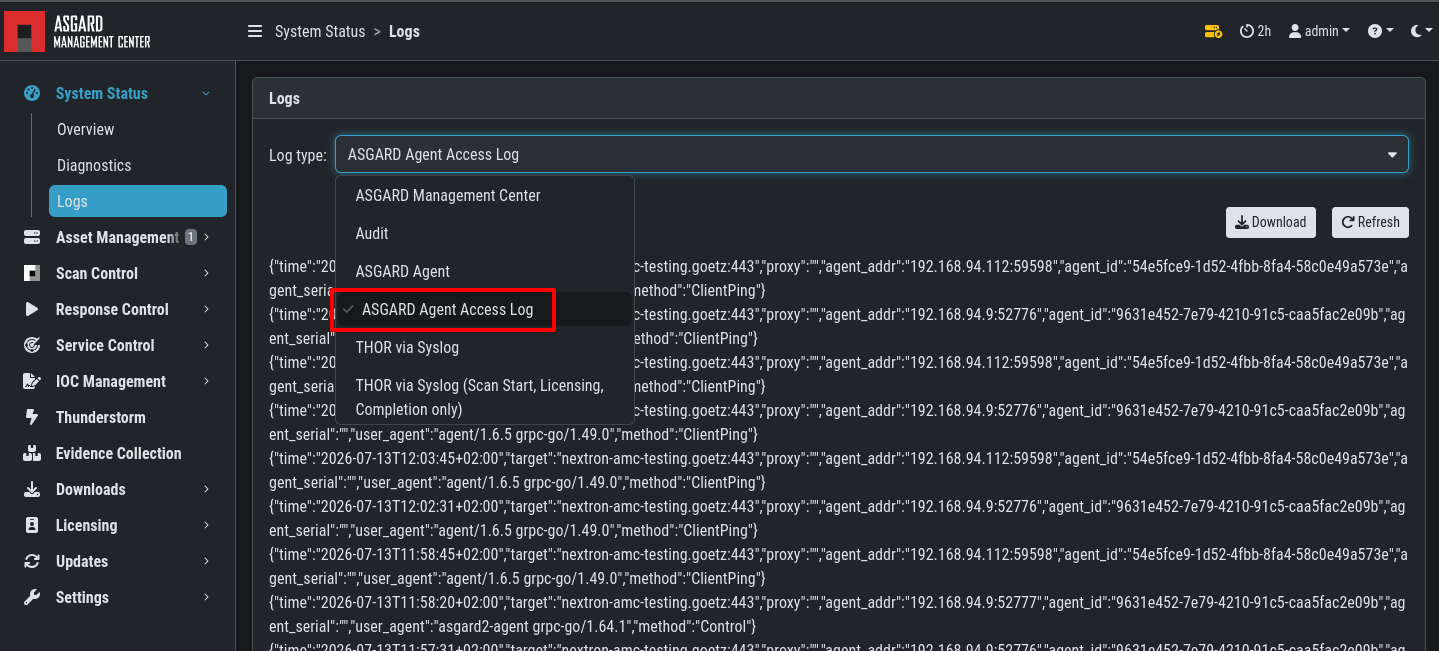
In addition, communication between the Agent and the Management Center can also be debugged using the ASGARD Agent Access Log.
Related Content