

Last Update:
Last verified version: THOR 10.7.27
Overview
This article guides you through automating THOR scans on macOS. Apple recommends using launchd instead of cron to automate process execution.
Prerequisites
-
The THOR package with a valid license is available.
-
The asset connects to the internet to retrieve THOR and signature updates from our update servers.
-
Administrative permissions are available.
-
The asset is unmanaged by the ASGARD agent.
-
Required exceptions were configured in the EDR.
Expected result
The asset is regularly scanned with THOR and the scan reports are stored in the log directory /usr/local/var/log/thorScan for further evaluation.
Steps to proceed
-
Move the THOR application folder to
/var/lib/thor10-osx. -
Create a shell script with THOR flags for your use case (e.g., "threads", "resume", "portal-key") and save it as
/usr/local/thorScan.sh. Using the “portal-key” flag obtains a license for this host from http://portal.nextron-systems.com with this API key.This feature is only supported for host-based server / workstation contracts.Make it executable:
Bash$ sudo vi /usr/local/thorScan.sh ... #!/bin/bash /var/lib/thor10-osx/thor-util update /var/lib/thor10-osx/thor-macosx --threads 2 --resume --portal-key "YOUR API KEY" -e /usr/local/var/log/thorScan ... $ sudo chmod +x /usr/local/thorScan.sh -
Create a .plist file with the execution instructions for your script and store it as
/Library/LaunchDaemons/thorScan.plist. Define the Calendar Interval settings ("Weekday 1" = Monday):Bash$ sudo vi /Library/LaunchDaemons/thorScan.plist ... <?xml version="1.0" encoding="UTF-8"?> <!DOCTYPE plist PUBLIC "-//Apple//DTD PLIST 1.0//EN" "http://www.apple.com/DTDs/PropertyList-1.0.dtd"> <plist version="1.0"> <dict> <key>Label</key> <string>thor.scan</string> <key>StandardErrorPath</key> <string>/usr/local/var/log/thorScan/thorScan.err.log</string> <key>StandardOutPath</key> <string>/usr/local/var/log/thorScan/thorScan.out.log</string> <key>ProgramArguments</key> <array> <string>/usr/local/thorScan.sh</string> </array> <key>StartCalendarInterval</key> <array> <dict> <key>Weekday</key> <integer>1</integer> <key>Hour</key> <integer>10</integer> <key>Minute</key> <integer>00</integer> </dict> </array> </dict> </plist> ... -
Test your syntax with "plutil":
Bash$ sudo plutil /Library/LaunchDaemons/thorScan.plist -
Enable your THOR Scan launch daemon:
Bash$ sudo launchctl load /Library/LaunchDaemons/thorScan.plistBefore changing parameters of your .plist file, unload the launch daemon:
Bash$ sudo launchctl unload /Library/LaunchDaemons/thorScan.plist -
Assign Full Disk Access (FDA) to your THOR binary:
Open the FDA settings ("System Settings / Privacy & Security / Full
Disk Access"). Then switch to the Finder and go to folder
/var/lib/thor10-osx/("SHIFT + CMD + G").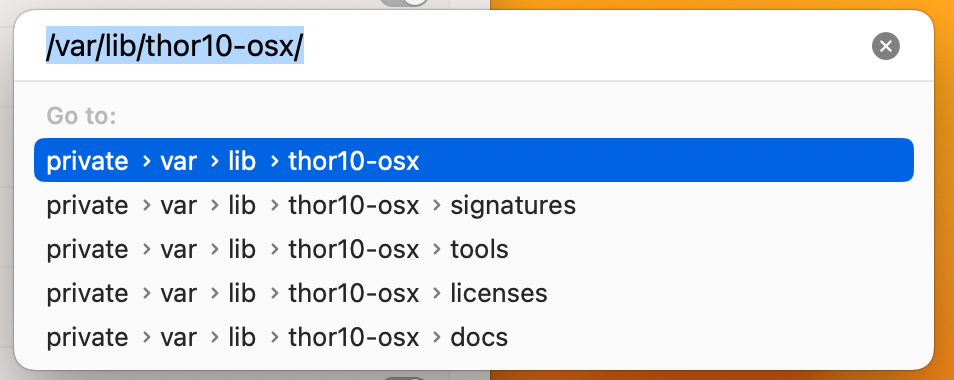
Now drag the "thor-macosx" binary into the FDA settings.
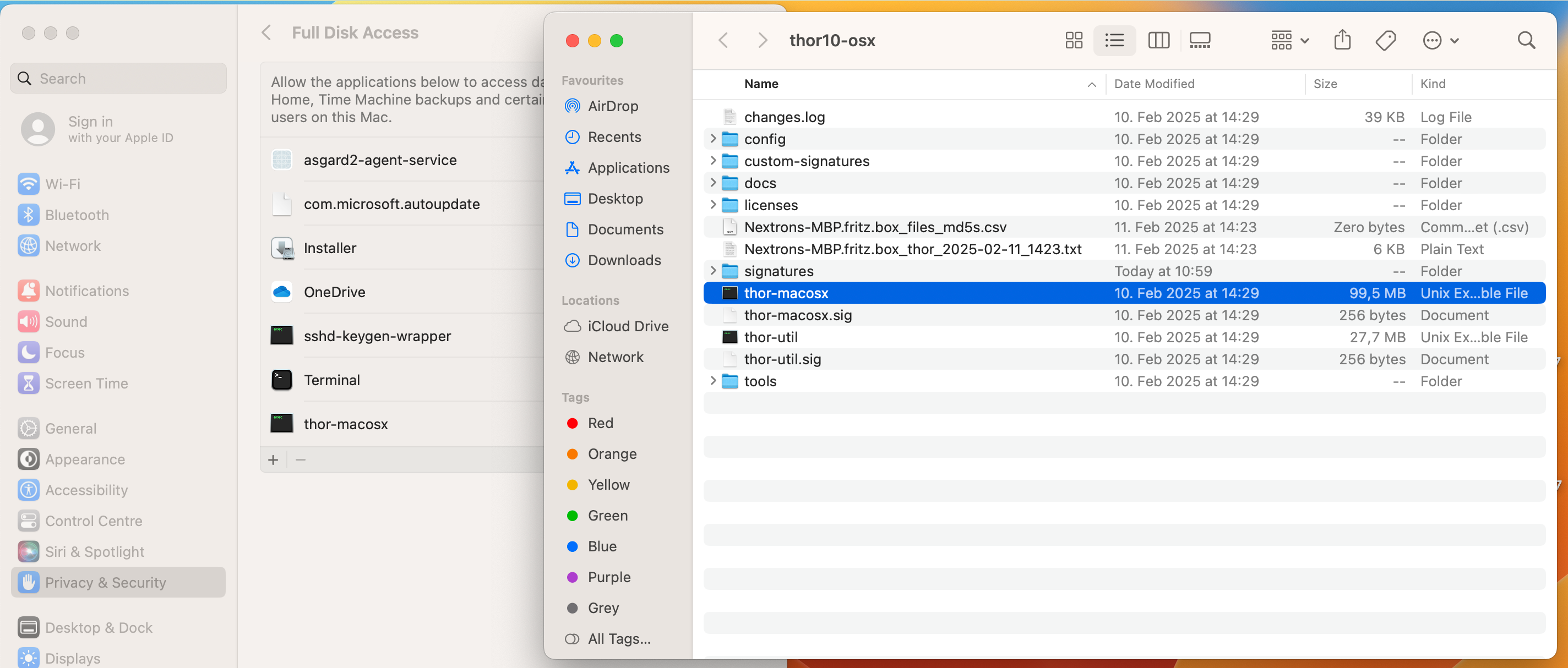
Don´t forget to load the daemon again to apply changes and re-enable it.
$ sudo launchctl load /Library/LaunchDaemons/thorScan.plist