

Last updated:
Last verified version: THOR 10.7
This article provides examples of how to use THOR to scan Docker images. The examples use the docker image of Alpine Linux. You can use any docker image providing a shell. Prerequisite is an operational Docker installation.
This article is based on these blog entries:
https://www.nextron-systems.com/2023/05/04/how-to-scan-docker-images-using-thor-part-1/
https://www.nextron-systems.com/2023/05/04/how-to-scan-docker-containers-using-thor-part-2/
Scanning an image
Use this procedure to check provided Docker images before productive use. The container is removed after exit.
Obtain the image and mount the THOR binary folder inside it. Assign the hostname stored in the THOR license to prevent license issues during scanning.
Inside the image, run these commands:
cd thor
docker run --rm -it -h ${HOSTNAME} -v ${PWD}:/thor alpine /bin/sh
./thor-linux-64
The result is stored inside the THOR folder an can be analyzed after exiting the container session.
Scanning the container
Use this procedure to check already running Docker containers.
First, you have to find the Docker ID of the container you want to check using: docker ps.
This will list all Docker containers running on the current host.
The following should also work with all the other containerization platforms (e.g. podman, Kubernetes, OpenShift, etc.).

docker ps
In this example, the ID is 84d1624f0083. Now copy the THOR files to the container:
docker cp thor/. 84d1624f0083:/thor
Next, to run THOR, we need to get an interactive shell inside the container:
docker exec -it 84d1624f0083 /bin/sh
Inside the Docker container you can cd thor and start THOR: ./thor-lite-linux.
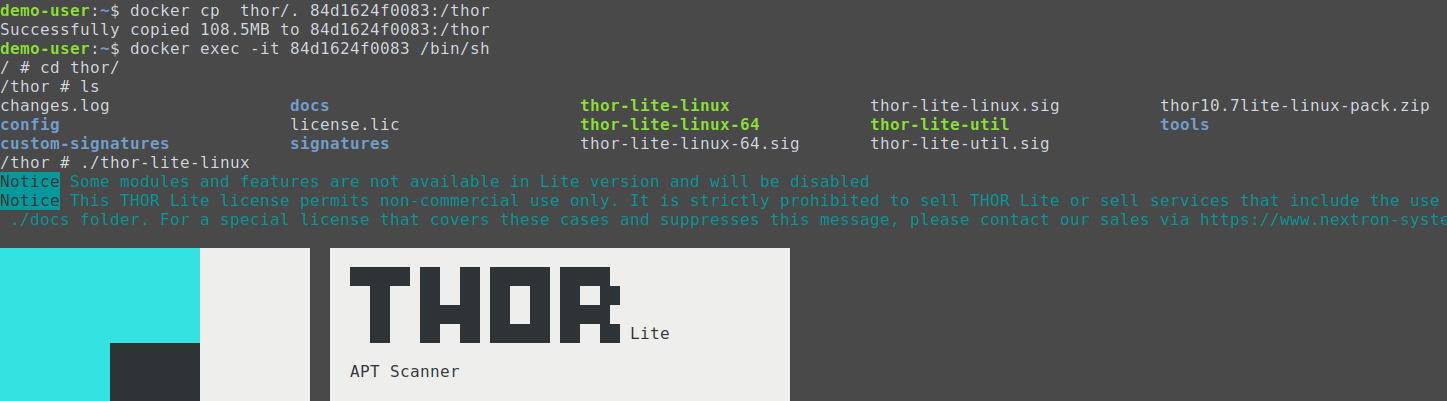
After THOR is finished you will find the following files in the Docker container:
-
{docker-id}_files_md5s.csv -
{docker-id}_thor_{date}.html -
{docker-id}_thor_{date}.txt
These files contain all findings of the THOR scan.
You can copy the reports back to your host by running the following on your host:
docker cp 84d1624f0083:/thor/dffcea1e1fe9_files_md5s.csv .
docker cp 84d1624f0083:/thor/dffcea1e1fe9_thor_2023-04-26_0728.html .
docker cp 84d1624f0083:/thor/dffcea1e1fe9_thor_2023-04-26_0728.txt .
You have to replace 84d1624f0083 with our Docker ID.
Lastly, to clean up your container run the following: docker exec -it 84d1624f0083 rm -rf thor.
This will delete all files that were created in the earlier steps.